Add a task with New task, nest subtasks under it, and set dates in the task details. Parent tasks then roll up their dates and progress from the subtasks automatically.
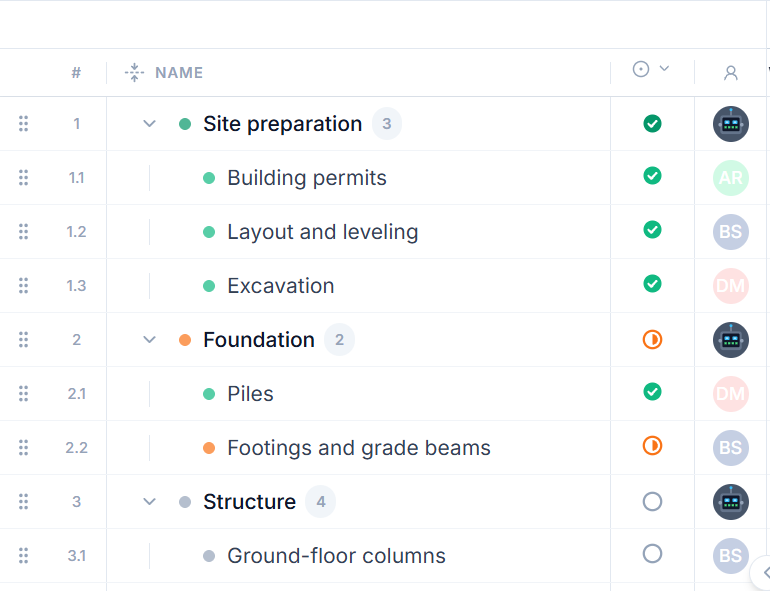
To add a task in GanttFather, open the project’s Gantt chart and click New task in the toolbar, type a name, and press Enter. To add a subtask, hover the parent task’s name and click the + button (Add subtask), type a name, and press Enter. The parent becomes a group whose dates and progress roll up from its subtasks.
Before you start
You need edit access to the project. If the project shows View only, the New task button and the row actions are not available.
Add a task
- Open the project and go to the Gantt chart.
- Click New task in the toolbar. An inline row appears in the task list with the placeholder “New task”.
- Type the task name.
- Press Enter. The task is created and the row stays open so you can type the next name. Press Esc when you are done. Clicking the check mark confirms one task and closes the row.
Pressing Enter on an empty row creates one task named “New task”, so type a name first.
Add a subtask
- Hover the name of the task that should become the parent.
- Click the + button that appears on the right of the name (Add subtask). You can also hover the bottom of a group and click the + Add subtask row.
- Type the subtask name, which starts as “New subtask”, and press Enter.
If the parent was collapsed, it expands so you can see the new row. A task that gets its first subtask turns into a parent: its bar becomes a thin summary bar and its dates now come from the subtasks.
Set dates, status, and owner
- Hover the task name and click the Details icon (expand arrows), or double-click the task bar.
- In the task details, use the Schedule section on the right for Start, End, and Duration.
- Use Assigned to, Status, and Priority in the same dialog. Changes save automatically (“All changes saved”).
You can also drag a leaf task’s bar to move it, or drag either edge to resize it. Parent bars cannot be dragged.
Move a task or change its level
Use the grip on the left of a row.
- Drag up or down to change its position, and sideways to change its level. Drag right to make it a subtask and left to move it out.
- Or click the grip for the menu: Move up, Move down, Indent, Outdent, Choose parent….
- Keyboard: Alt+Shift with the arrow keys does the same.
Moving a task with subtasks moves the whole group.
Delete a task
Hover the task name and click the trash icon, then confirm Delete in the dialog. This cannot be undone, and deleting a parent also permanently deletes its subtasks.
What happens next
- A parent’s start and end dates always come from its subtasks, and the details say so: “Dates roll up automatically from this task’s subtasks and can’t be edited directly.”
- A parent’s progress and its status roll up as well. The status shows Auto (from subtasks) unless you pin a specific status.
- Dependencies can only link tasks that share the same parent. See how to set task dependencies.
Common problems
- Symptom: there is no New task button or hover +. Cause: your role or the project is view-only. Fix: ask the owner for edit access.
- Symptom: the Start and End of a parent cannot be edited. Cause: they are calculated from its subtasks. Fix: change the subtasks’ dates.
- Symptom: “Use the complete task tree in manual order to move tasks.” Cause: a filter or a sort other than manual order is active. Fix: clear the filter and use manual order, then move the task.
- Symptom: “Wait until this task is saved and no one is editing it.” Cause: the task was just created or a teammate has it open. Fix: wait a moment and try again.
- Symptom: “Give this task a title.” Cause: the title in the task details was left empty. Fix: type a title.
Related guides
- How to create a project in GanttFather
- How to set task dependencies in GanttFather
- How to turn on and read the critical path in GanttFather
- How to read a Gantt chart
- Project milestone examples
How do you add tasks and subtasks in GanttFather?
Click New task in the Gantt toolbar and type a name, then hover a task and click the plus button to nest subtasks under it. Parent tasks roll up their dates and progress from the subtasks, and you can drag a task sideways to change its level.
Open GanttFather and build your first task list, then link the tasks and check the critical path.
Frequently asked questions
How many levels of subtasks can I create?
A subtask can itself have subtasks, and the indentation follows the real depth of the tree. We have not found a depth limit. If you plan a deep outline, test it in the app.
Does deleting a parent task delete its subtasks?
Yes. Deleting a task removes it together with its subtasks.
Can I add tasks from the List view?
The List view has its own New task toolbar action. The steps above are for the Gantt chart, where the same task list sits beside the timeline.
Want to skip the reading?
GanttFather is free forever, with no card and no trial.