The critical path is the longest chain of dependent tasks and sets the earliest finish date. Learn to find it with a worked Gantt chart example.
The critical path is the longest chain of dependent tasks in a project, and its length sets the earliest date the project can finish. A delay to any task on that chain delays the whole project by the same amount. Tasks that are not on it have float (also called slack): time they can slip without moving the finish date.
This guide works through a small website launch step by step, from the task list to a Gantt chart, so you can check every number yourself.
Critical path, critical task and float
- Critical path: the chain of dependent tasks with the greatest total duration from start to finish. Its length is the shortest time in which the project can be done.
- Critical task: any task on that chain. Its float is zero.
- Float (slack): how long a task can be delayed without delaying the project finish.
- Near-critical task: a task with only a little float. A small slip can make it critical.
The critical path can change: a slip on a near-critical task, a new dependency or a new estimate can make a different chain the longest.
How do you find the critical path?
- List the tasks needed to reach the finish.
- Estimate a duration for each task, in working days.
- Add the dependencies: what each task has to wait for.
- Forward pass: from the start, calculate each task’s earliest start (ES) and earliest finish (EF).
- Backward pass: from the finish, calculate each task’s latest start (LS) and latest finish (LF) that still keep the finish date.
- Float: subtract LS − ES for each task. Tasks with zero float are critical, and together they form the critical path.
The example below uses finish-to-start links only: a task starts when its predecessors finish. Start-to-start, finish-to-finish and start-to-finish links, and lag (a wait added to a link), change the arithmetic but not the idea. The dependency types guide explains each one.
Worked example: launching a small website
A small team is launching a website for a neighborhood bakery. Here are the seven tasks, how long each takes in working days, and what each one waits for.
| Task | Duration | Predecessors |
|---|---|---|
| A · Plan the site | 2 days | None |
| B · Write the content | 6 days | A |
| C · Design the pages | 4 days | A |
| D · Build the pages | 5 days | C |
| E · Set up hosting and domain | 2 days | A |
| F · Load content and test | 3 days | B, D, E |
| G · Launch | 1 day | F |
Days are counted like a ruler, from 0 at the start of the project. A task that runs from 2 to 8 starts when day 2 ends and finishes at the end of day 8, so it lasts 6 days.
Forward pass: earliest start and finish
Go from the first task to the last. A task’s earliest finish is its earliest start plus its duration. A task can start only when all its predecessors are done, so its earliest start is the largest earliest finish among them.
- A runs from 0 to 2.
- B, C and E wait only for A, so they can all start at 2. B finishes at 8, C at 6 and E at 4.
- D waits for C, so it runs from 6 to 11.
- F waits for B (8), D (11) and E (4). It has to wait for the last of them, so it runs from 11 to 14.
- G runs from 14 to 15.
The project needs 15 working days, or three working weeks.
Backward pass: latest start and finish
Now go from the last task back to the first, keeping the finish at 15. A task’s latest start is its latest finish minus its duration. A task must be done before any of its successors has to start, so its latest finish is the smallest latest start among them.
- G must finish by 15, so it must start by 14.
- F must finish by 14, so it must start by 11.
- B, D and E have one successor, F, so each must finish by 11. D must start by 6, B by 5 and E by 9.
- C must finish by 6, when D has to start, so it must start by 2.
- A comes before B (5), C (2) and E (9). It must finish by 2, the smallest of the three, so it must start by 0.
Float and the critical path
Float is the gap between the two passes: latest start minus earliest start. Latest finish minus earliest finish gives the same number.
| Task | ES | EF | LS | LF | Float | Critical |
|---|---|---|---|---|---|---|
| A · Plan the site | 0 | 2 | 0 | 2 | 0 | Yes |
| B · Write the content | 2 | 8 | 5 | 11 | 3 | No |
| C · Design the pages | 2 | 6 | 2 | 6 | 0 | Yes |
| D · Build the pages | 6 | 11 | 6 | 11 | 0 | Yes |
| E · Set up hosting and domain | 2 | 4 | 9 | 11 | 7 | No |
| F · Load content and test | 11 | 14 | 11 | 14 | 0 | Yes |
| G · Launch | 14 | 15 | 14 | 15 | 0 | Yes |
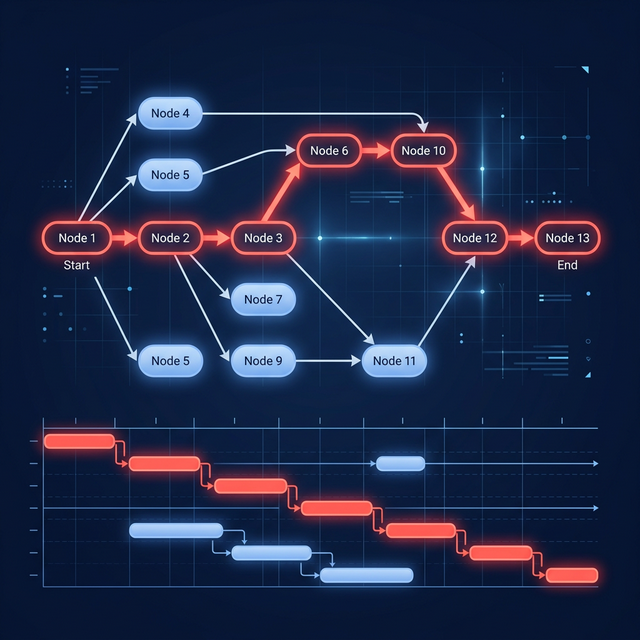
The tasks with zero float form the critical path: A → C → D → F → G. Their durations add up to 2 + 4 + 5 + 3 + 1 = 15 days, the length of the project. The other chains are shorter: A → B → F → G takes 12 days and A → E → F → G takes 8, which is where the 3 and 7 days of float come from.
The critical path on a Gantt chart
On a Gantt chart, the critical path is the chain of bars that runs from start to finish without a gap: each critical bar starts exactly where the one before it ends.
A long pale extension means a task has room to slip. A red bar has none: an extra day on it pushes every bar after it, and the launch, to the right.
What happens when a task slips?
A critical task slips by 2 days. Design (C) takes 6 days instead of 4 and finishes at 8. Build (D) can now start only at 8 and finishes at 13, loading and testing (F) runs from 13 to 16, and the launch finishes at 17 instead of 15. The project moves by exactly the 2 days that design slipped.
A task with float slips within its float. Writing (B) takes 8 days instead of 6 and finishes at 10. Loading and testing (F) still has to wait for the build, which finishes at 11, so nothing else moves and the launch still finishes at 15. B has used 2 of its 3 days of float and has 1 left.
Float is a buffer, not spare time. If writing slipped by 4 days instead, it would use all 3 days of float and push the launch 1 day, to 16. The critical path would change too: A → B → F → G would become the longest chain.
| Change | Launch finishes at | Finish moves by |
|---|---|---|
| None (the plan above) | 15 | 0 days |
| Design (C) takes 2 days longer | 17 | 2 days |
| Writing (B) takes 2 days longer | 15 | 0 days |
| Writing (B) takes 4 days longer | 16 | 1 day |
This is what the critical path is for: it tells you which delays move the finish date and which ones the plan can absorb.
Total float, free float and negative float
- Total float is how long a task can slip without delaying the project finish. It is the number in the table above.
- Free float is how long a task can slip without delaying the earliest start of the next task. In the example the two are the same, because B and E each feed only F. When several tasks with float sit on the same chain, the float one task uses is taken from the tasks after it.
- Negative float means the plan cannot meet a required date under its current assumptions. It is a warning to change the scope, the sequence, the durations or the date, not time you can use.
The float and slack guide covers how to read and protect float in more detail.
Common mistakes when using the critical path
- Missing or illogical dependencies. Every task except the first needs a predecessor, and every task except the last needs a successor. Gaps hide the real longest chain.
- Linking summary tasks as if they were work. Link the tasks inside them instead.
- Durations that are really wished-for dates. The calculation is only as good as the estimates.
- Ignoring calendars. Weekends, holidays and part-time people change the real dates.
- Ignoring people’s capacity. If the same person has to do two tasks at once, the real schedule is longer than the calculated one.
- Treating “critical” as “important”. Zero float is arithmetic; priority is a business choice. A high-priority task can have float, and a technical task nobody watches can be critical.
- Calculating it once. Update the remaining durations as work progresses and review the path at your normal rhythm: weekly on a project of several months, daily during a launch.
Critical path method vs PERT
Use the critical path method (CPM) when one duration per task is a fair estimate and the order of the work is the main question. Use PERT-style three-point estimates (optimistic, most likely and pessimistic) when the uncertainty of the durations needs explicit treatment. Many teams combine them: three-point estimates for the uncertain tasks, then a dependency network to find the path.
| Question | CPM | PERT-style estimation |
|---|---|---|
| Main focus | The order of dependent work | Uncertainty in durations |
| Duration input | One estimate per task | Optimistic, most likely, pessimistic |
| Main output | Critical and near-critical paths | Expected duration and its spread |
| Main risk | False precision from weak logic | False confidence in guessed ranges |
The PERT chart vs Gantt chart guide compares the two diagrams.
How does GanttFather show the critical path?
In GanttFather, the critical path is a toggle in the Gantt and List views. Switch it on to see which tasks set the finish date. Tasks can be linked finish-to-start, start-to-start, finish-to-finish or start-to-finish, with lag, so you can model the example above, or your own plan, the way the work really flows.
GanttFather has no baselines, so it does not compare the current plan with a saved original. It is free for one project you own, with 2 editors and unlimited free viewers.
Map your own critical path in GanttFather
Frequently asked questions
Is the critical path always the longest path?
Yes, measured in time rather than in number of tasks: it is the chain with the greatest total duration through the dependency network. Fixed dates and calendars can affect the result, so check what your plan counts as working time.
Can a project have more than one critical path?
Yes. Two or more chains can tie for the longest duration. A delay on any of them moves the finish, so the plan has less room to absorb slips.
Does the critical path account for limited resources?
Not by itself. The classic calculation uses durations and dependencies only, and assumes every task can start as soon as its predecessors finish. When the same people or equipment are needed for two tasks at the same time, you need resource leveling or another capacity check, and the result can be a longer schedule.
What is the difference between the critical path and the critical chain?
The critical chain method, introduced by Eliyahu Goldratt in 1997, starts from the critical path but also accounts for limited resources, and it moves the safety margin out of individual tasks into shared buffers at the end of the chain. The critical path method assumes the resources are available and leaves float wherever the arithmetic puts it.
Who developed the critical path method?
James E. Kelley Jr. of Remington Rand and Morgan R. Walker of DuPont developed it in the late 1950s. PERT was developed separately, for the U.S. Navy, to schedule research and development work with uncertain durations.